
Deals
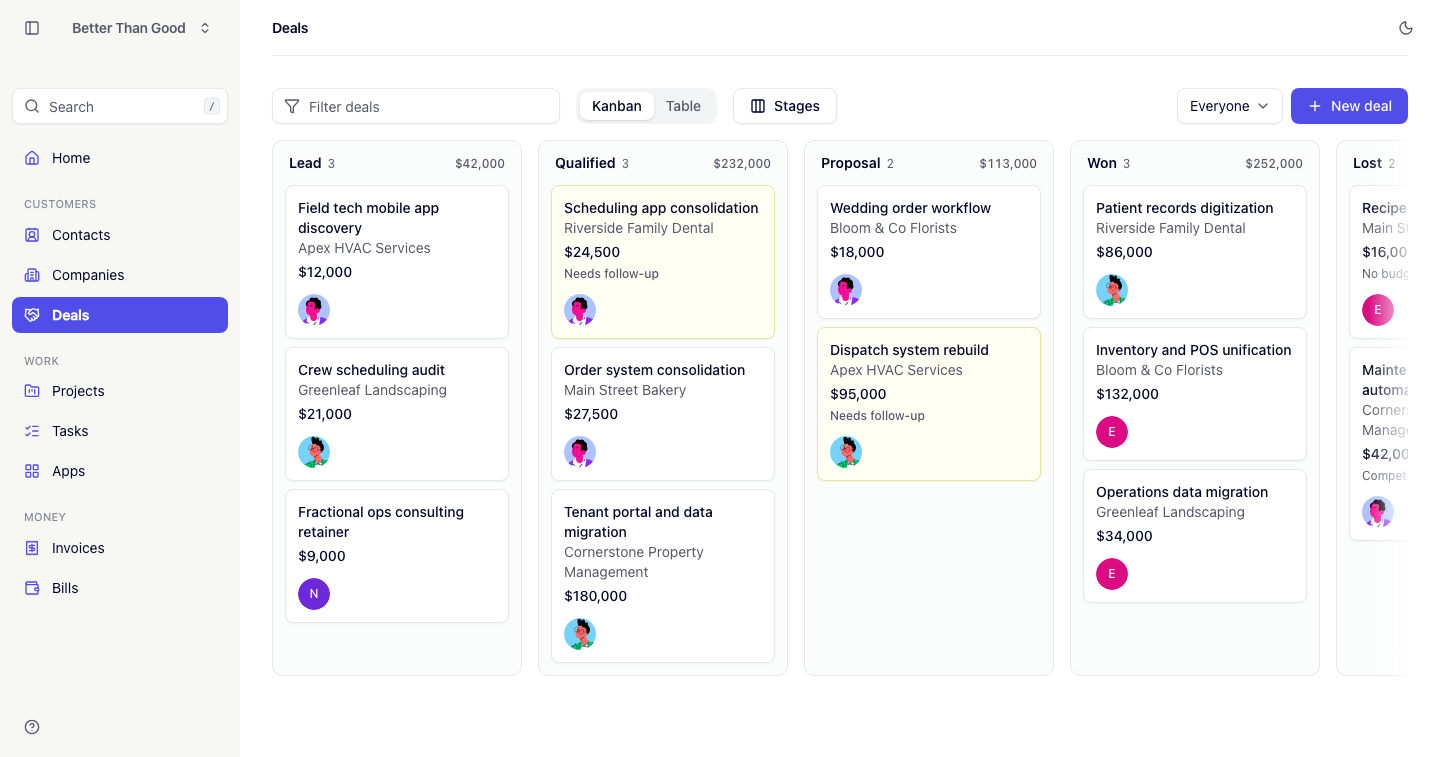
A deal is an opportunity. Deals are shown on a board with one column per stage.
Stages
| Stage | Meaning |
|---|---|
| Lead | The default stage for a new deal |
| Qualified | Worth pursuing |
| Proposal | A price has been given |
| Won | Closed, won |
| Lost | Closed, lost |
Lead, Qualified and Proposal are the open stages. These are the stages counted by “Open deals” on Home and by the Open figure on a company page.
The board
Deals have one view. Each column header shows the stage name, the number of deals in it and the total value of the column in the account currency.
Cards show the deal name, company, value and owner avatar. Edit and delete actions appear on hover.
A deal that has gone quiet — no change and no note in the last 7 days — is marked on the board, so the deals counted under Needs attention on Home are visible where you work them.
The filter narrows the board as you type, matching deal name, company name and contact first or last name.
Moving a deal
Drag a card to another column. The drop target highlights during the drag. The card stays where it is dropped, so the order within a column is set by hand.
A deal can also be moved from its own page using the stage tabs.
Creating a deal
Press New deal.
| Field | Notes |
|---|---|
| Name | Required |
| Company | The client |
| Contact | Narrows to the selected company’s contacts |
| Owner | The teammate running the deal |
| Value | In the account currency |
| Expected close date | |
| Stage | Defaults to Lead |
The deal page
- Stage tabs across the top show all five stages. Clicking one moves the deal to that stage, placing it at the end of that column. The current stage is highlighted.
- Details shows value, company, contact, owner, expected close date and a link to the deal’s project once one exists.
- Notes fill the wide column — a timeline of Markdown entries, newest first, each with its author and a relative timestamp.
Creating a project from a deal
On a deal in the Won stage, a Create project button appears. It creates a project with the deal’s name and client, linked to the deal (see Projects).
- Only won deals can be turned into projects.
- A deal has at most one project. Pressing the button again opens the existing project.
Follow-up
Home lists open deals with no change and no note in the last 7 days under Needs attention. Adding a note removes a deal from that list.